Green Line on Mobile Screen? Quick Fixes That Actually Work

A green line on your mobile screen can be alarming. It’s even more concerning when it appears out of nowhere and disrupts display clarity. This problem is common in many smartphones, like Android and iPhone. It can happen due to software glitches or hardware damage.
In this article, we share the best expert-approved solutions to fix the green line on your mobile screen. We also help you decide when you need professional repair.
What Causes a Green Line on a Mobile Screen?
A green vertical or horizontal line on your phone screen often happens for these reasons:
-
OLED or AMOLED display pixel damage
-
Loose or damaged display connector
-
Software bugs after system updates
-
Physical damage from drops or pressure
-
Moisture or water exposure
Knowing the cause helps us decide if we can fix the issue with software or if it needs a hardware repair.
1. Restart Your Mobile Phone
Sometimes the green line appears due to a temporary display or graphics glitch. Restarting your phone refreshes system processes and can resolve minor software-related display issues.
If the line disappears after restarting, no further action is required.
2. Check for Software Updates
Manufacturers often release updates to fix display and graphics bugs.
Go to your phone’s settings and check for pending software updates. Installing the latest version might fix the green line issue, especially if it showed up after a recent update.
3. Test the Screen in Safe Mode
Booting your phone into Safe Mode disables third-party apps. If the green line goes away in Safe Mode, a new app might be causing display issues.
Uninstall suspicious or recently added apps and restart your phone normally.
4. Run a Display Test
Some phones offer built-in hardware diagnostic tools. You can use trusted display test apps to see if the green line shows up with different colours.
If the line stays visible during display tests, it often means there's a hardware problem with the screen.
5. Gently Press the Screen Edges
In rare cases, a loose display connector can cause colored lines on the screen. Applying gentle pressure around the edges may temporarily fix the issue.
If the line changes or vanishes under pressure, the display connection probably needs expert repair.
6. Check for Physical or Water Damage
A green line often appears after the phone has been dropped or exposed to moisture. Even minor internal damage can affect OLED pixels.
If your phone has been dropped or got wet, replacing the screen is usually the best fix.
7. Factory Reset as a Last Software Fix
If all software-based fixes fail, a factory reset can help rule out system corruption.
Always back up your data before resetting. If the green line remains after the reset, the problem is almost certainly hardware-related.
8. When Screen Replacement Is Required
Green lines on OLED and AMOLED screens are often caused by pixel burn or panel failure. Unfortunately, these issues cannot be repaired through software.
In these cases, replacing the display is the best way to get full screen functionality back.
Call to Action: Professional Mobile Repair in Dubai
If the green line on your mobile screen does not go away, expert help ensures a safe and lasting fix. Atdoorstep provides quick and dependable Mobile Repair Dubai services. Their skilled technicians focus on screen and display problems.
Our mobile screen repair services in Dubai offer:
-
On-site diagnosis
-
High-quality replacement screens
-
Clear pricing
-
Same-day service in most cases
Whether your phone needs a display connector fix or a full screen replacement, Atdoorstep delivers trustworthy, professional results.
Contact Atdoorstep now for reliable mobile repair. Restore your phone’s display clarity quickly.
Final Thoughts
A green line on your mobile screen is important. It often shows there’s display damage. Basic troubleshooting can fix software issues, but persistent lines often need a professional to repair the screen.
For expert mobile repair in Dubai, pick experienced technicians. This choice protects your device and boosts its long-term performance. For more details, call our toll-free number at 045864033.
Categorii
- Arts & Entertainment
- Causes
- Crafts
- Dance
- Drinks
- Film
- Health
- Food Trends
- Gaming
- Home & Garden
- Health & Fitness
- Literature
- Music & Concerts
- Networking
- Alte
- Party
- Religion
- Shopping
- Sports
- Theater
- Wellness
- Cryptocurrency
- NFT Trends
- Coin update
- Lifestyle
- Business & Finance
- Entrepreneurship
- Marketing Strategies
- Personal Finance
- Investment Tips
- Industry Trends
- Technology
- Gadgets & Reviews
- Software & Apps
- Cybersecurity
- Emerging Technologies
- How-To Guides
- Educaţie
- Movie & TV Reviews
- Celebrity News
- Book Reviews
- Personal Development
- Motivation & Inspiration
- Life Hacks
- Community & Culture
- Local Events
- Cultural Insights
- Social Issues
- Interviews & Spotlights
- Volunteering & Activism
- Science & Nature
- Animal Behavior
- Beauty Tips
- Fashion Trends
- Product Reviews
- Food & Drink
- Cooking
- Restaurant Reviews
- Travel
- Arts & Crafts
- Photography
- Workout Routines
- Parenting Tips
- News
- Tips & Tricks
- Case Studies
- Product Reviews
- Interviews
- Opinion
- Research & Insights
- Events Coverage
- Personal Stories
- Anunturi
- Trends & Predictions
- Guest Posts
Citeste mai mult
Executive Summary Methylene Diphenyl Di-Isocyanate (MDI) Market Size and Share Across Top Segments CAGR Value Data Bridge Market Research analyses that the global methylene diphenyl di-isocyanate (MDI) market is expected to grow at a CAGR of 5.3% in the forecast period of 2023 to 2030 and is expected to reach 41,946,759.77 thousand by 2030. This global Methylene Diphenyl Di-Isocyanate...

According to a new report published by Introspective Market Research, Personalized Cell Therapy Market by Therapy Type, Therapeutic Area, and End-User, The Global Personalized Cell Therapy Market Size Was Valued at USD 15.10 Billion in 2023 and is Projected to Reach USD 114.63 Billion by 2032, Growing at a CAGR of 25%.” Introduction / Market Overview: The global personalized cell...

Global Colored Gemstones Market - Size, Share, Demand, Industry Trends and Opportunities Global Colored Gemstones Market, By Product Type (Colored Diamond, Emerald, Ruby, Sapphire, Others), Product Format (Natural, Synthetic), End Use (Jewelry and Ornaments, Luxury Arts), Country (U.S., Canada, Mexico, Brazil, Argentina, Rest of South America, Germany, France, Italy, U.K., Belgium, Spain,...
Executive Summary Asia-Pacific Algae Products Market: Share, Size & Strategic Insights CAGR Value Algae products are used in a variety of industries to commercially manufacture valuable end products such as food and beverage, nutraceuticals, pharmaceuticals, paints and colourants, Algae Product, fertiliser, and fuel. Carotenoids, lipids, algal proteins, hydrocolloids, and...
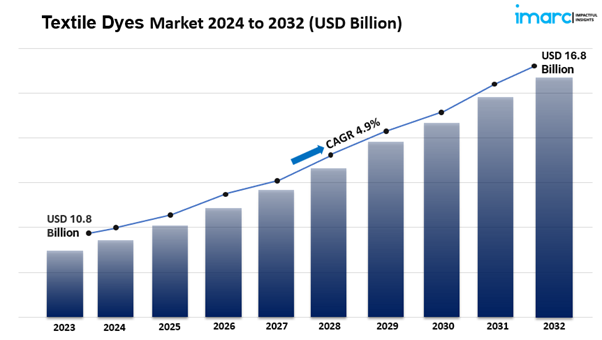
IMARC Group, a leading market research company, has recently released a report titled “Textile Dyes Market Report by Dye Type (Direct, Reactive, Vat, Basic, Acid, Disperse, and Others), Fiber Type (Wool, Nylon, Cotton, Viscose, Polyester, and Others), Application (Clothing and Apparels, Home Textiles, Automotive Textiles, and Others), and Region 2025-2033”. The study provides a...